Updated November 5, 2026
RMM · Remote Monitoring and ManagementRMM Software for MSPs with AI Failure Prediction
RMM software for MSPs with deep inventory, real-time monitoring, disk benchmarking, native remote access, patch management, network discovery, automation and AI failure prediction — all in one agent and one console. Built so MSPs can operate hundreds of devices without stitching five tools together.
Already a customer? Sign inWhat is RMM software?
RMM software (Remote Monitoring and Management) is what MSPs use to monitor, manage and support their customers’ computers and servers remotely. An agent installed on each device lets you track infrastructure health in real time, receive alerts, automate tasks and fix problems remotely — often before the user notices. It is the operational foundation of any managed service provider.
Why MSPs choose GestorMSP RMM software
Enterprise-grade depth, with the whole operation unified in one place.
One agent, the whole fleet
Native Go agent for Windows, Linux and macOS: inventory, metrics, automation and remote access from a single console.
AI that anticipates, not just alerts
Storage health, disk failure prediction and capacity forecasting from S.M.A.R.T. signals, so you can act before the ticket.
Remote access already included
Remote desktop, shell and PowerShell with session recording — no need to license a separate remote access tool.
Patching and software under control
Patch dashboard, automation profiles and software distribution to standardize maintenance at scale.
See the entire network
SNMPv3 discovery, NAC, vulnerability scanner and topology — plus containers, Kubernetes and multi-cloud.
Natively integrated with PSA/ITSM
An RMM alert becomes a ticket and billing automatically, with no fragile connectors between vendors.
Complete disk benchmark
Throughput, IOPS, latency and I/O pressure, plus S.M.A.R.T., surface scan, RAID and partitions — on demand.
RMM software features
The platform covers the whole monitoring and remote management operation — from hardware inventory to network security and AI. Main capabilities by domain:
Inventory & assets
- Detailed hardware: CPU, GPU, memory, disks and network
- Installed software and license tracking
- Running processes and services
- S.M.A.R.T. disk health, benchmark and RAID status
- Per-device contracts and financial billing
- Wake-on-LAN and asset audit history
Real-time monitoring
- Live metrics and executive dashboards
- Disk benchmark: throughput, IOPS, latency and I/O pressure
- Configurable monitoring profiles
- Sensors and UPS units
- Containers, Docker and Kubernetes
- Virtualization, multi-cloud and edge computing
- Domain controllers and hybrid infrastructure
Remote access & support
- Remote desktop with session recording
- Collaborative sessions and support chat
- Shell, remote PowerShell and reverse shell
- Secure reverse tunnels
- File transfer (upload/download)
- Per-agent remote access policies
Automation, alerts & AI
- Smart alerts with prioritization
- Script automation and execution at scale
- Policy engine
- Anomaly detection
- AI failure prediction (e.g., disk via S.M.A.R.T.)
- Scheduled maintenance windows
Patch, software & backup
- Patch management dashboard
- Patch automation profiles
- Software distribution and deployment
- Backup and storage providers
- Agent deployment via native installers and Chocolatey
- OTA updates and rule synchronization
Network & discovery
- Network discovery via SNMPv3
- Asset inventory, alerts and network reports
- Network access control (NAC)
- Vulnerability scanner
- Topology visualization
- Dedicated discovery agent
Security & compliance
- Certificate revocation verified via OCSP
- Gateway security (zero-trust)
- Privileged commands signed with Ed25519 and anti-replay nonce
- Dynamic RBAC and logical tenant isolation
- Per-agent mTLS, binary integrity and sanitized logs
- Aligned with ISO 27001, SOC 2, NIST CSF, CIS and LGPD/GDPR — see the controls table
Integrations & agent
- Native Go agent (Windows, Linux, macOS)
- Native integration with ITSM and PSA
- Alert → ticket → billing synchronization
- IoT and dedicated agents
- External services, webhooks and RabbitMQ
- Real-time events via WebSocket
Reports & SLA
- Advanced reports and export
- SLA and performance reports
- Compliance and audit reports
- Executive dashboards per customer
- Aggregated multi-tenant metrics
- Scalable architecture (Kubernetes/Helm, HPA)
Benchmark & integrity
- On-demand benchmark: quick and standard profiles
- Read and write throughput (MB/s)
- Read and write IOPS
- Average and worst-volume latency
- I/O pressure and average queue
- S.M.A.R.T., surface scan, RAID, partitions and space
RMM software disk benchmark
Measure what matters to predict slowdowns and failures: throughput, IOPS, latency and I/O pressure — on demand, with recorded consent.
Throughput and IOPS
Read and write in MB/s and IOPS per volume, to compare disks and detect degradation.
Latency
Average and worst-volume latency, in ms, to spot bottlenecks that the average hides.
I/O pressure
I/O pressure on Linux, plus utilization and average queue, to see when the disk became the bottleneck.
S.M.A.R.T. and integrity
S.M.A.R.T. attributes, surface scan, RAID, partitions and space analysis in the same panel.
Quick and standard profiles
A quick benchmark for triage or a full one for diagnosis, triggered on demand on the device.
Consent and history
Execution with recorded acknowledgment, cancellation, retention and per-device reports.
The benchmark is optional and runs on demand; it does not run continuously in production. Numbers vary with hardware, load and profile.
AI anticipates the failure before the ticket
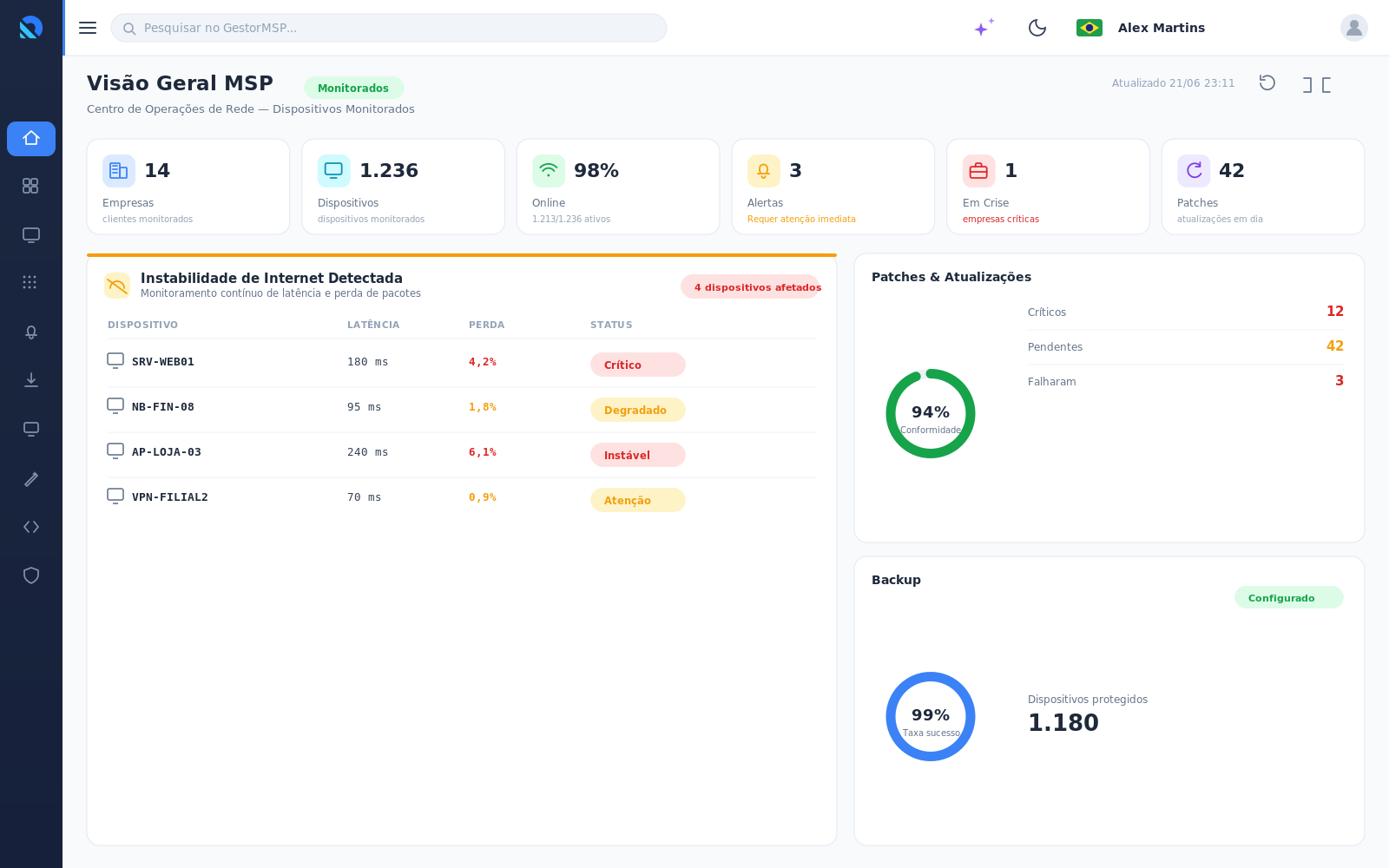
GestorMSP’s AI engine analyzes device health signals, anticipates failures before downtime and returns an actionable recommendation to your team — reducing reactive tickets and downtime.
Illustrative representation of the interface. Sample numbers.
How much does an MSP RMM cost?
GestorMSP lets you choose between per-device and per-user pricing, and the modules are independent. The trial runs 14 days, no credit card, with up to 25 devices. Reference prices as of October 2026; the full table is at plans and pricing.
Free trial
14 days with RMM, ITSM and PSA, up to 25 devices. No credit card and no lock-in.
RMM your way
Starting at $1.00 per device/month or $99.00 per user/month, with network discovery and the vulnerability scanner on the per-device plan and AI on the per-user plan. The per-device plan has a 25-device minimum.
Free remote access
Connect is free for up to 5 devices, without network discovery and without AI.
How to compare: per-device pricing tends to pay off when your team grows more slowly than your fleet; per-technician pricing tends to pay off when there are many endpoints per analyst. See the full plans table.
RMM per device or per user: choose the model
Some RMMs impose a single pricing model. With GestorMSP, you choose what fits your operation — and buy only the modules you need.
| Model | How it works | When it makes sense | GestorMSP |
|---|---|---|---|
| Per technician | Charges per professional who operates the platform | When there are many endpoints per analyst and the team barely grows | — |
| Per device | Charges per monitored endpoint | When the fleet grows faster than the team | ✓ |
| Per user | Charges per platform user | When the team grows and the fleet is stable | ✓ |
With GestorMSP, RMM can be licensed per device ($1.00/device/month) or per user ($99.00/user/month). PSA and ITSM are per user ($29.00 and $25.00/user/month); CRM is a per-user add-on. Reference prices as of October 2026.
No mandatory bundle
RMM, ITSM, PSA, CRM, SOC and AI are independent modules. Buy only what makes sense for your operation.
Native PSA/ITSM
When you buy the modules, they talk to each other — no external connector and no forced bundling.
One agent, one console
The same agent covers inventory, monitoring, disk benchmark, patching and remote access.
GestorMSP RMM software vs. traditional RMM
How the unified, AI-powered model compares with a stack assembled from separate tools.
| Feature | GestorMSP | Traditional RMM |
|---|---|---|
| Native Windows / Linux / macOS agent | ✓ | Partial |
| Remote access (desktop/shell) included | ✓ | Separate tool |
| AI failure prediction and recommendation | ✓ | Varies |
| On-demand disk benchmark (throughput, IOPS, latency, pressure) | ✓ | Rare |
| Network discovery + vulnerability scanner | ✓ | Extra module |
| Containers, Kubernetes and multi-cloud | ✓ | Varies |
| PSA / ITSM on the same platform | ✓ | External integration |
“Traditional RMM” describes the market standard for a stack assembled from separate tools, not a specific product.
Ready to unify your operation’s RMM?
See GestorMSP RMM working with your scenarios — inventory, monitoring, remote access, patching and AI in action — in a guided 14-day trial.
Start free for 14 days →What is included in the trial: RMM, ITSM and PSA for 14 days, no credit card, with up to 25 devices. Advanced features, such as script automation, AI and integrations, are released in stages and may vary by plan. See the plans table.
Frequently asked questions about RMM software
Straight answers to the most common questions from people evaluating an RMM for MSPs.
What is RMM?
RMM (Remote Monitoring and Management) is the software MSPs use to monitor, manage and support their customers’ computers and servers remotely. Through an agent installed on each device, your team tracks infrastructure health in real time, receives alerts, automates tasks and fixes problems remotely — often before the user notices.
Which operating systems does the GestorMSP agent support?
GestorMSP has a native Go agent for Windows, Linux and macOS. It collects hardware and software inventory, real-time metrics, disk health (S.M.A.R.T.), processes and services, and runs automations and remote access sessions.
Does GestorMSP RMM handle patch management and software distribution?
Yes. The module includes a patch dashboard, patch automation profiles and software distribution, plus backup and storage providers — to standardize maintenance across the whole device fleet.
Do I need a separate tool for remote access?
No. Remote access is native to GestorMSP: remote desktop (with session recording), remote shell and PowerShell, reverse tunnels and file transfer — from the browser to the terminal, without licensing an external tool.
Does the RMM discover and monitor network devices?
Yes. There is network discovery via SNMPv3, asset inventory, network access control (NAC), a vulnerability scanner and topology visualization, plus monitoring of containers, Docker, Kubernetes, virtualization and multi-cloud. Network discovery and the vulnerability scanner are included in the per-device plan.
How does GestorMSP AI help RMM operations?
The embedded AI calculates storage health, detects anomalies and predicts failures — for example, anticipating a disk failure from S.M.A.R.T. signals — and returns a recommendation so your team can act before the problem causes downtime, going beyond just sending alerts. AI is included in the per-user plan.
How much does GestorMSP RMM cost?
The trial is free for 14 days, no credit card, with up to 25 devices. After the trial, RMM can be licensed per device (from $1.00/device/month, 25-device minimum, with network discovery and the vulnerability scanner included) or per user ($99.00/user/month, unlimited devices, with AI included). Connect remote access is free for up to 5 devices. Reference prices as of October 2026; the current table is at plans and pricing.
Does the RMM run a disk benchmark?
Yes. The benchmark runs on demand on the device, with recorded consent, and measures read and write throughput, IOPS, average and worst-volume latency, and I/O pressure. The dashboard also brings together S.M.A.R.T., surface scan, RAID, partitions and space analysis. The benchmark does not run continuously in production.
Can RMM be billed per device or per user?
Yes. GestorMSP lets you license RMM per device ($1.00/device/month) or per user ($99.00/user/month). PSA and ITSM are per user ($29.00 and $25.00/user/month); CRM is a per-user add-on. Reference prices as of October 2026.
Do I have to buy the full bundle?
No. RMM, ITSM, PSA, CRM, SOC and AI are independent modules. You buy only what you need, with no mandatory bundle. When two modules are active, the integration is native.
Is RMM sold separately?
RMM is a module of the unified GestorMSP platform, which also includes ITSM, PSA, CRM, SOC and AI. RMM licensing can be per device or per user; PSA, ITSM and CRM are per user. RMM alerts can become tickets and billing in PSA/ITSM automatically, with no external integration. The 14-day trial unlocks RMM, ITSM and PSA; current plans and prices are at plans and pricing.